Your day on Home
By Compliance OS on September 29, 2026
BeginnerHome shows what needs you today. Start at the top and work down.
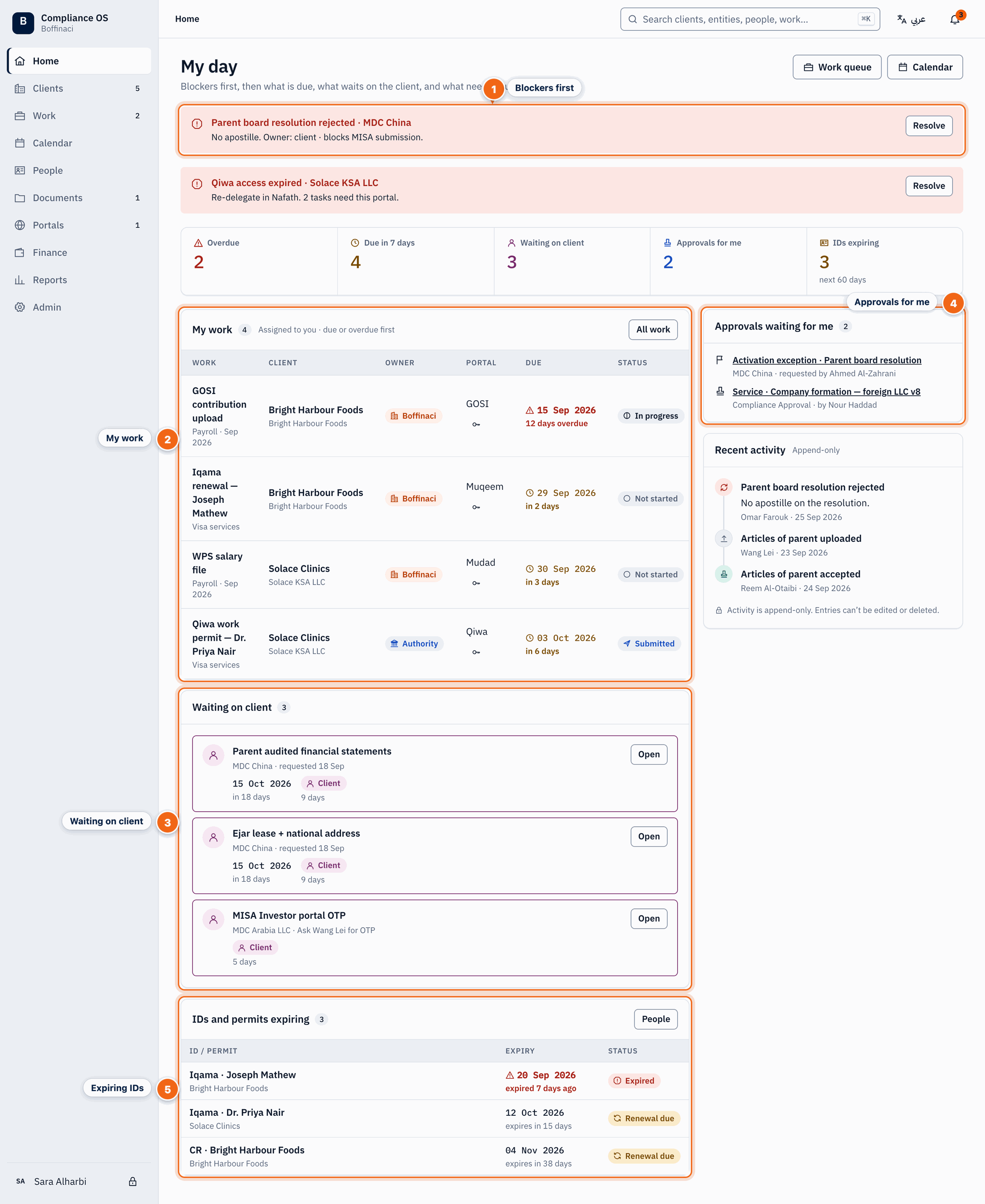
- Blockers first: Blockers are listed at the top; click Resolve to go straight to the record that is blocked.
- My work: Tasks assigned to you, overdue and due soonest first; click a row to open it.
- Waiting on client: Items the client still owes, with how long they have been waiting.
- Approvals for me: Exceptions and master changes that need your approval.
- Expiring IDs: Iqamas, permits and CRs expiring soon; open People for the full list.
1. Clear blockers first
Blockers stop a client's work. Click Resolve to jump to the blocked record.
2. Work through My work
Your tasks, overdue and due soonest first. Click a row to open the task.
3. Chase what the client owes
Waiting on client lists items the client still has to send, and for how long.
4. Decide approvals
Exceptions and Setup Studio changes waiting for you. You never see your own requests here.
5. Watch expiring IDs
Iqamas, permits and CRs expiring soon. Open People for the full list.
Next: Log a new enquiry
Was this article helpful?
No comments yet. Login to start a new discussion Start a new discussion