Work queue
By Compliance OS on September 29, 2026
BeginnerThe work queue lists every task across clients.
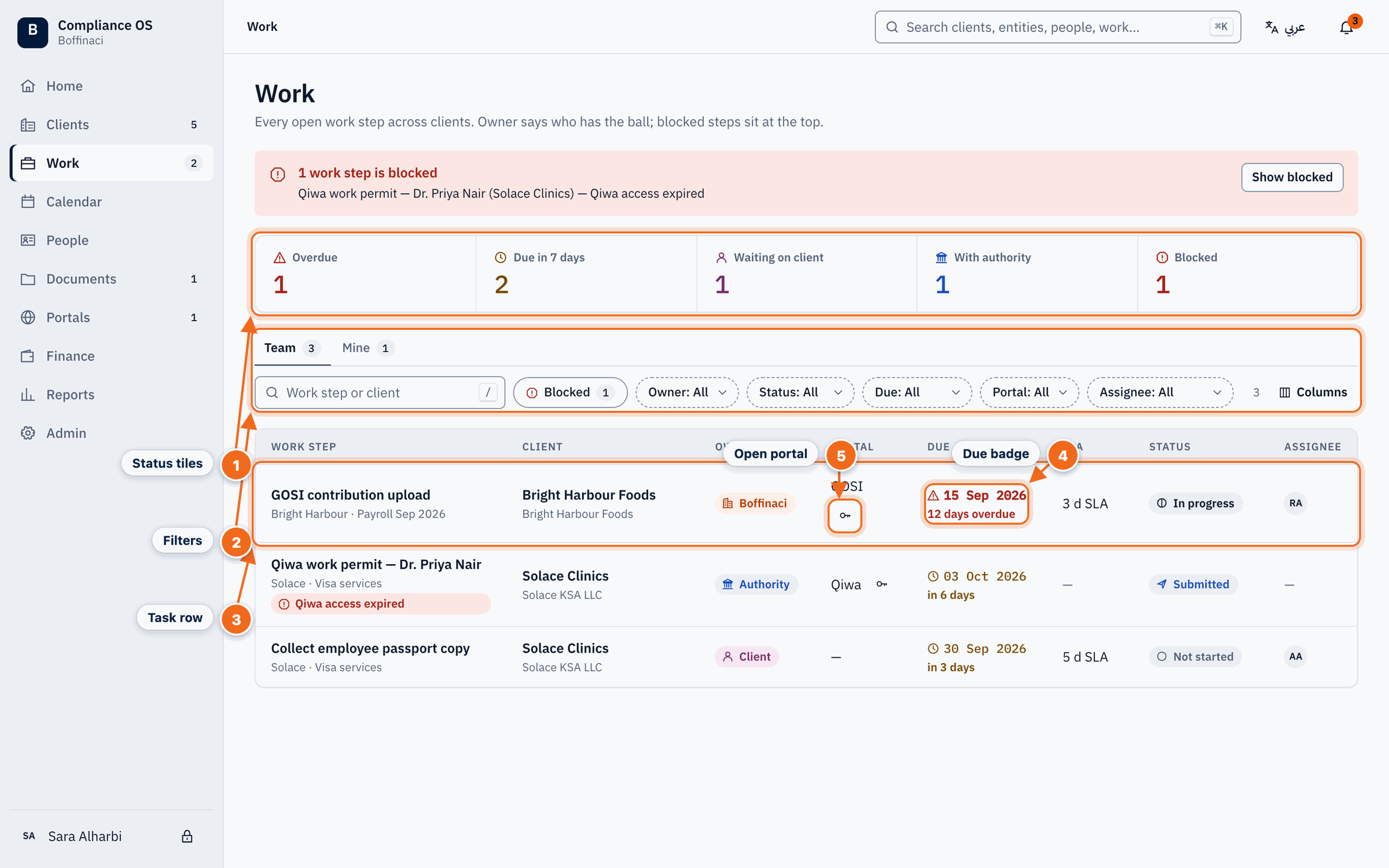
- Status tiles: Overdue, due soon, waiting on client, with authority and blocked counts; click a tile to filter.
- Filters: Switch Team / Mine and filter by owner, status, due date, portal or assignee.
- Task row: Each task shows the client, owner, portal, due date and status; click to open it.
- Due badge: The due badge counts down to the deadline and turns red when overdue.
- Open portal: Opens the task's government portal securely — reason required, access logged.
1. Choose Team or Mine
Switch between everyone's work and your own.
2. Filter
Click a tile (overdue, due soon, waiting on client, blocked) or use the filters.
3. Watch due dates
The due badge counts down and turns red when a task is overdue.
4. Open a task
Click a row to open the task page. Task links on Home, the Calendar, Customer 360 (Work tab), notifications and search all open the same page.
5. Open a portal
If the task uses a government portal, open it from the row. You give a reason, and the access is logged.
Next: Work on a task
Was this article helpful?
No comments yet. Login to start a new discussion Start a new discussion