Send a proposal and convert to a customer
By Compliance OS on September 29, 2026
IntermediateWhen the prospect is ready, send a proposal. When they sign, convert the enquiry into a customer.
1. Generate a proposal
On Enquiry 360, click Generate proposal. Fees are grouped as professional, government, third-party and recurring, and come from the Fee master.
2. Convert to customer
Click Convert to customer.
3. Set the customer and legal entities
The customer is the commercial relationship. Legal entities are the companies you do compliance for. One customer can own several.
4. Check the services and versions
Each service is pinned to the published version shown. It stays on that version until someone deliberately migrates it.
5. Convert and start onboarding
Review What will be created, then click Convert & start onboarding.
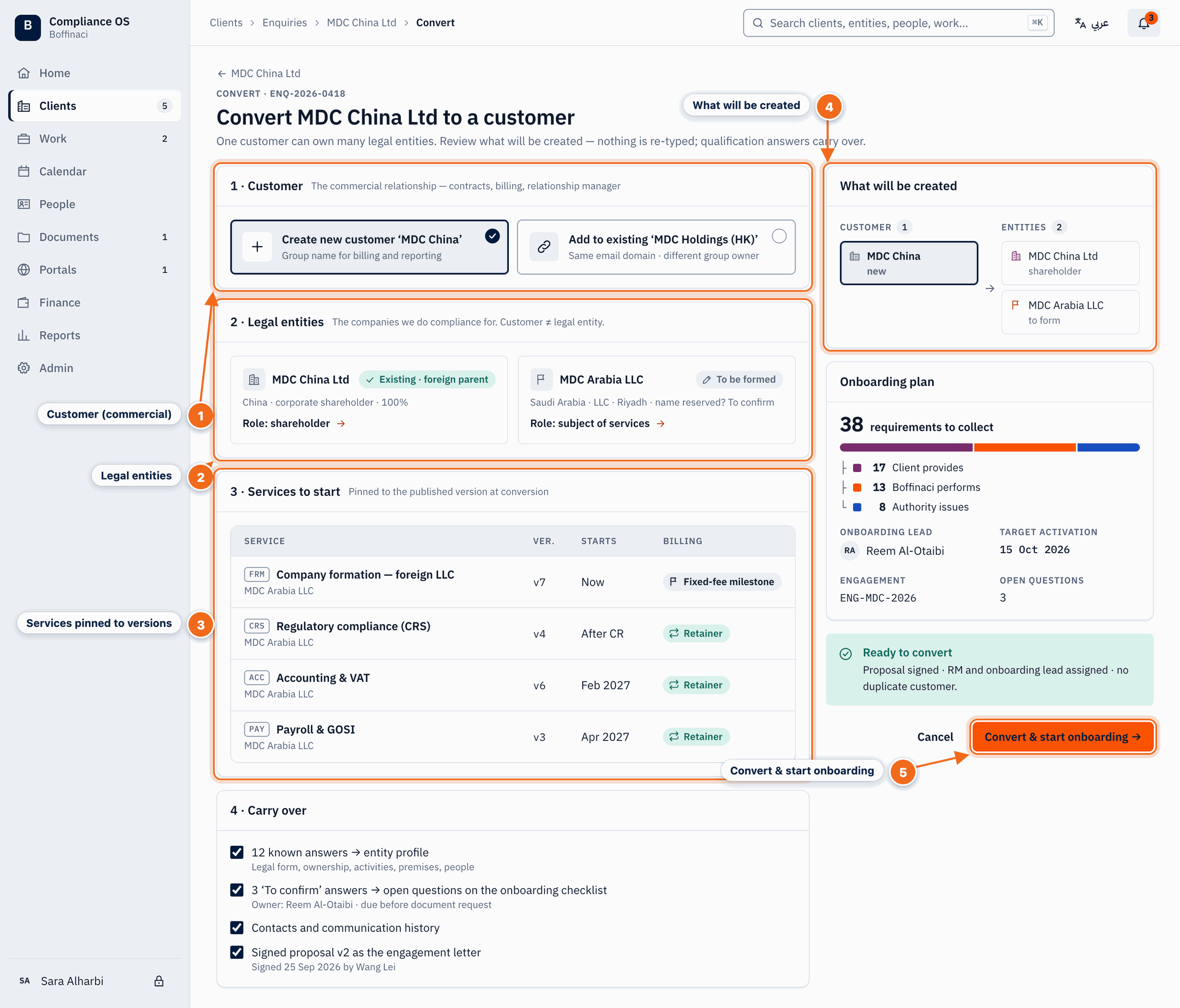
- Customer (commercial): Choose whether to create a new customer — the commercial relationship — or add to an existing one.
- Legal entities: The companies Boffinaci does compliance for; one customer can own several legal entities.
- Services pinned to versions: Each service starts pinned to the published version shown, and stays on it until deliberately migrated.
- What will be created: A summary of the customer, entities and onboarding that conversion will create.
- Convert & start onboarding: Creates the records and opens the onboarding wizard.
Next: Start an onboarding
Was this article helpful?
No comments yet. Login to start a new discussion Start a new discussion